
Looking for the Zongo Dub Siren? This browser siren brings together an oscillator, an LFO, an echo and nine patches. Here is how its controls are organised and what the blog’s dub siren offers as an alternative: an XY playing surface, personal sounds, settings shared by link and WAV recording.
Try our online dub siren: play in your browser, then explore the settings explained in this article.
This overview describes the controls visible on the page on 5 November 2026. It is not an audio review, a latency measurement or a mobile compatibility test.
Understanding Zongo’s controls
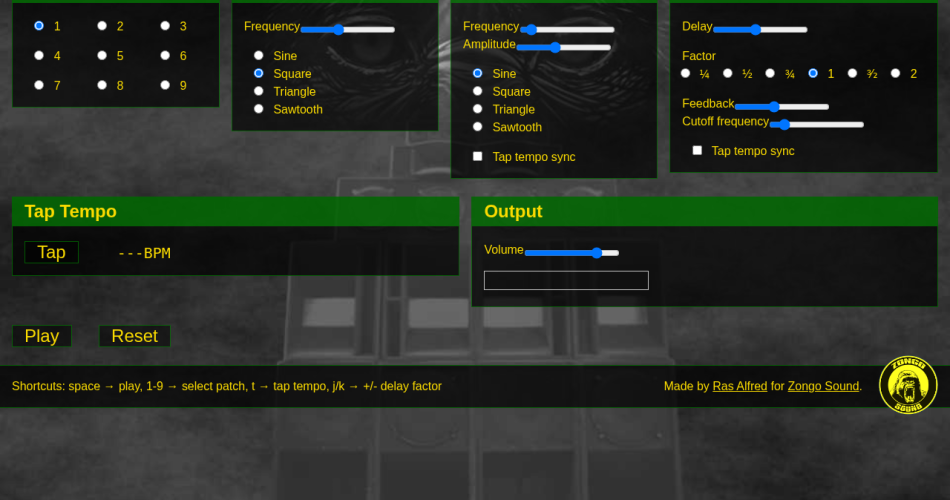
Zongo’s interface displays Output Volume, a Play button and patches numbered 1 to 9. These patches provide starting points for exploring the controls. Whichever tool you choose, start with a low listening volume.
The interface separates three sections. Carrier is the oscillator that produces the sound. LFO is the modulator used to vary it. Echo groups the repetition controls. For the underlying principles, read the dub siren guide before exploring the settings.
Pitch, modulation and waveforms
The Carrier has a Frequency control and four waveforms: Sine, Square, Triangle and Sawtooth. A waveform changes the timbre; frequency sets the oscillator’s pitch.
The LFO has its own Frequency and Amplitude controls and the same four waveform options. In a modulated siren, modulation speed and depth distinguish a slow sweep from a faster variation. Zongo also displays a Tap tempo sync option for the LFO.
Echo and tap tempo
The Echo section displays Delay Factor, Feedback and Cutoff frequency. The available factors are ¼, ½, ¾, 1, ³⁄₂ and 2. A Tap button and BPM display complete the interface; the echo has its own Tap tempo sync option.
A delay time controls the spacing between repetitions. Feedback determines how much signal is fed back, while a filter can change the colour of those repetitions. Zongo’s labels provide these reference points, but do not establish the precise parameter ranges or how the feedback loop behaves at extreme settings.
The listed keyboard shortcuts
The Shortcuts line lists space for Play, 1 to 9 for patches, T for tap tempo and J/K to increase or decrease the Delay Factor. A Reset button is also present. These are the shortcuts advertised by the interface; their operation in a particular browsing context has not been verified here.
Zongo or the blog’s siren: which features?
What they have in common: both interfaces offer starting sounds, pitch and modulation controls, an echo and tap tempo. Zongo presents nine patches, Carrier/LFO controls and four waveforms for each of those two sections.
Playing our siren: its XY surface maps horizontal movement to pitch and vertical movement to speed. There are ten starting sounds, a FIRE button and a Hold control to keep playing without holding down the button.
Keeping your settings: our interface offers eight personal sound slots, settings shared by link and WAV recording including the echo. Advanced mode provides additional controls. These are features displayed by our tool; this overview does not establish their absence from Zongo and does not compare the sound quality of the two sirens.
Explore the settings on our dub siren
Choose a starting sound and explore pitch and speed with the XY surface. Then adjust the echo spacing and repetitions. When you find settings you like, you can keep them in My sounds or use the sharing link.
Play the blog’s online dub siren: the tool is embedded in the page, with controls for saving, sharing and recording your sound.
Sources: the Zongo Dub Siren interface, credited to Ras Alfred for Zongo Sound, and the official Zongo Sound profile; the blog’s Dub Siren MK-II interface. Consulted on 5 November 2026. Comparison of displayed features, without comparative listening tests or latency measurements.