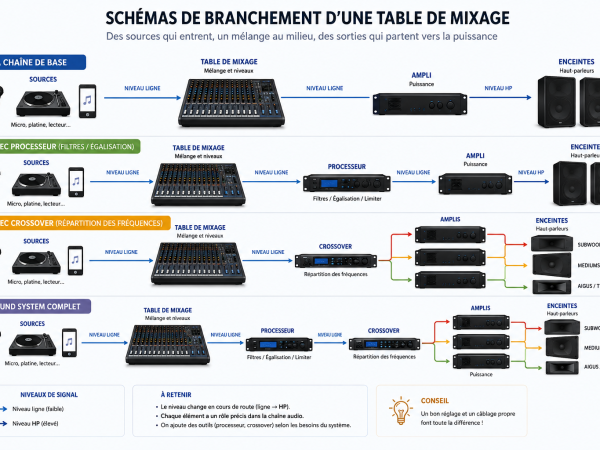

You are playing, the wall is ten metres in front of you, and what you hear comes back late. At thirty metres that is close to a tenth of a second. Enough to lose track of a beatmatch, enough to push the gain without noticing.
That is what a monitor is for. And it is also why you cannot just wire it anywhere.
What a monitor actually does in a sound system
On a normal stage, a monitor lets the musician hear themselves. In a sound system it does something else: it gives you a reference with no delay and without the colour of the wall.
- Beatmatching. You cannot line up two tracks if you hear the result offset in time.
- Gain control. The wall sends mostly bass back at you. You think you have headroom on top, and you clip.
- The mic. An MC who cannot hear themselves pushes their voice, and it shows.
- Effects. You send a delay, you hear it come back half a second later, you add more. The classic mistake.
The wrong way: splitting the master output
The reflex is to put a Y cable on the master output and feed a small amp with it. It works, technically. But you box yourself in:
- The monitor follows the master. Pull the master down and your monitor goes with it.
- You cannot balance it separately: if you want more voice in your monitor and less in the room, it is not possible.
- A passive Y splits the signal and loads the output. On long runs you lose level and gain hiss.
It gets you through one night. It is not an installation.
The right way: the auxiliary send
Any half-serious mixer has an auxiliary send, also called aux send, monitor send or foldback. It is a second mix, independent from the master, with one knob per channel.
The principle is simple: each channel sends as much as you want into that separate mix, the mix leaves through its own socket, and that socket feeds the monitor amp. Your monitor becomes a listening mix you build, not a copy of the master.

Pre-fader or post-fader: the setting that changes everything
This is the part almost everyone gets wrong. An auxiliary send is taken either before the channel fader or after it.
Pre-fader: for a monitor
The send ignores the fader position. You can close a channel completely in the room and still hear it in your monitor. That is exactly what you want to cue up the next track or check a mic before opening it.
Post-fader: for an effect
The send follows the fader. Pull the channel down and the send goes with it. That is what you want for a delay or a reverb, which should disappear when the source disappears.
On many mixers a pre/post switch lets you choose. If yours is fixed post-fader you can still use it, but you lose the ability to hear closed channels.
If your mixer has no auxiliary send
- A second master output. Many mixers have an XLR master and a jack master, or a rec output. You lose independent balance, but you avoid the passive Y.
- The headphone output. Often forgotten and often enough: it has its own volume, and many mixers let you route the cue to it rather than the master. It is the simplest monitor there is.
- The effects send. If you are not using it for an effect, it makes a perfectly good auxiliary send. Watch out: it is usually post-fader.
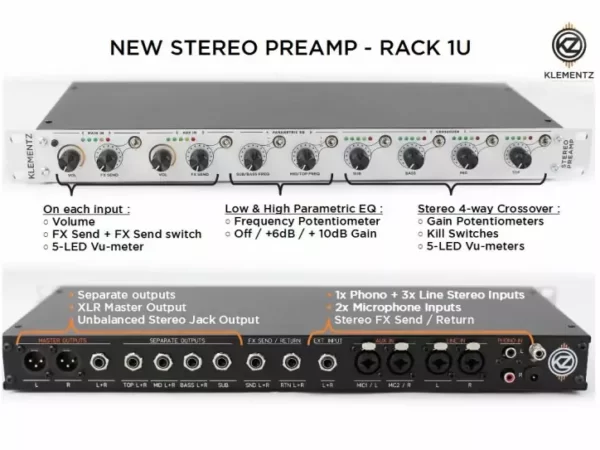
- A sound system preamp. Most of them carry one or more separate sends on top of the filter outputs.
Setting the monitor without feedback
Feedback happens when the mic hears the monitor again. Three habits solve it most of the time:
- Put the monitor behind the mic, never in front of it. A cardioid mic rejects what comes from behind.
- Bring it up in steps. Raise until it rings, drop one clear notch, and stop there.
- Cut the bass in the monitor. You do not need sub in your listening mix: the wall handles that, and bass in the monitor shakes the whole stand.
The mistakes we see most often
- Feeding the monitor from an active filter output: you will only get one frequency band.
- Putting the monitor on the same amp channel as the tops: you lose any independent control.
- Forgetting the monitor is a speaker too: it needs a suitable amp, not whatever power is left over.
- Leaving the monitor full range: on a stand it muddies the very thing you are trying to hear.
Effects wiring follows exactly the same send and return logic, detailed in how to plug an effect in a mixer. And if you are looking for a unit that already carries those sends, the list is here: dub and reggae preamp manufacturers.
For the cable between the mixer and monitor, check whether your equipment uses a balanced or unbalanced connection.
Thanks for reading, I hope this article was helpful!
🙏 If you enjoyed it, please share on your social networks 🙏
And if you have any remarks, thoughts, experiences or arguments to share:
Feel free to share in the comments below!