
A dub preamp is best explained by listening to it. Load a track, kill the sub, bring it back, throw an echo: in two minutes you understand what the selector is doing behind the desk. This free simulator runs in your browser, with nothing to install, and your track is never sent anywhere.
The online dub preamp at a glance
- Two decks, A and B, with a crossfader: load your own tracks (MP3, WAV, M4A) or start the demo riddims, one drop and steppers.
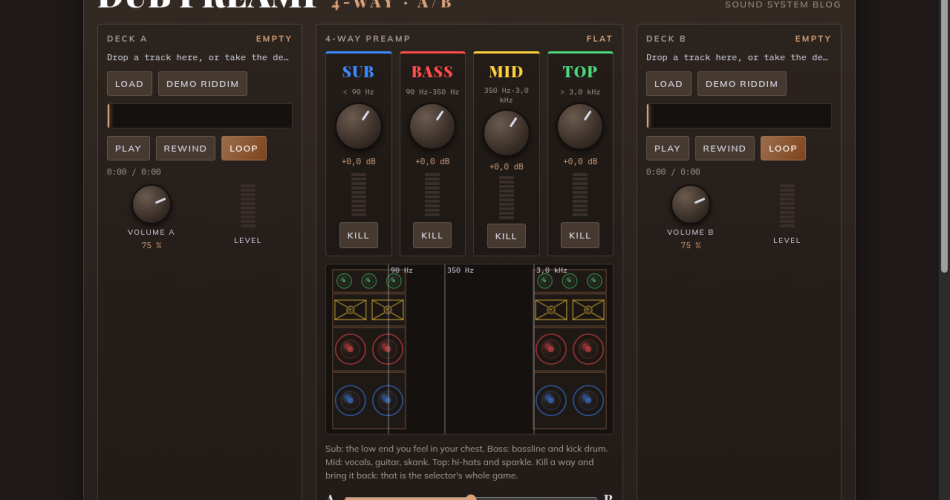
- A 4-way preamp: sub, bass, mid and top, each with its own level, Kill button and meter.
- A resonant filter: low-pass to the left, to keep only the lows; high-pass to the right, to keep only the highs.
- A tape-style echo with a send level, a Send button to hold and a delay time slider, a spring reverb and a siren with 7 modes (Rise & fall, Swoop, Hi-lo, Horn, Drop, Burst, Ramp), with its play surface and volume, patched into the echo.
- A spectrum analyser with an animated sound system: each speaker lights up with its own way.
- An advanced mode: crossover frequencies, resonance, warmth, mono, tempo, MIDI Learn to play with a controller, and a link to share your setting.
What does a preamp do in a sound system?
In a reggae or dub sound system, the preamp sits between the source (turntable, mixer) and the amps. Its main job is to split the signal into several frequency ways. Each way goes to its own amp, then to its own speakers. Sub goes to the scoops, bass to the bass bins, mid to the mid cabinets, often horn-loaded, and top to the tweeters.
That split is what gives the selector their game: kill the sub to let the room breathe, then bring it back on the drop; push the mids to get a voice through; filter the whole track before releasing it. On most dub preamps, each way has its own level knob and often a button to kill it instantly.
For the whole chain in detail, read how a sound system works. For the difference between splitting before the amps and filtering inside the speaker, see active and passive filters.
The 4 ways and their crossover points
The simulator’s default settings use common values. You can change them in advanced mode.
- Sub, below about 90 Hz: the low end you feel in your chest more than you hear it.
- Bass, from 90 to 350 Hz: the bassline and the kick drum.
- Mid, from 350 Hz to 3 kHz: vocals, guitar, skank, horns.
- Top, above 3 kHz: hi-hats, cymbals, sparkle.
The simulator uses 24 dB per octave Linkwitz-Riley filters, like many active crossovers. Their advantage: with every way at 0 dB, the sum gives back the original sound, with no bump or dip around the crossover points.
How to use it
- Click Load (or drop a file on a deck), or take the Demo riddim.
- Start playback, then play with the four knobs and the Kill buttons. Keys 1 to 4 also kill the ways.
- Play the siren on its surface: press and slide, left and right for pitch, down and up for speed.
- Hold Send (E key) at the end of a phrase: it goes into the echo without cutting the dry signal, repeats, then fades out. The slider sets the time between repeats.
- Add the siren on the breaks with FIRE or the space bar.
- Open advanced mode to move the crossover points, switch to mono or connect a MIDI controller (Chrome and Edge).
Why listen in mono?
A sound system almost always plays in mono: both sides of the stack play the same signal. A track that is very wide in stereo can lose some of its parts once summed. The Mono button in advanced mode lets you check that a track holds up before you play it on a real system.
The limits of a simulator
This online preamp is for understanding and practising. It does not replace a real preamp or a real amp chain: latency depends on your browser and sound card, and headphones or desk speakers tell you little about the sub. To discover the real units and their makers, see the list of dub and reggae preamps.
Want a more complete siren? The blog’s online dub siren simulates the two-555 NJD circuit, with tape echo, ready-made sounds and recording.
Frequently asked questions
Are my tracks uploaded to a server?
No. The file is read by your browser, on your device. Nothing is sent, nothing is kept.
Which file formats work?
Whatever your browser can play: MP3, WAV and M4A everywhere, FLAC and OGG in most recent browsers.
Does it work on a phone?
Yes, on a recent phone. Turn the volume up and, on iPhone, switch off silent mode.
Can I play it with a MIDI controller?
Yes, in Chrome and Edge: open advanced mode, enable MIDI, then use MIDI Learn to assign your knobs and buttons.